OrderHue

Make your order statuses do the follow-up work

OrderHue Pro adds rules to the free OrderHue status manager. When an order enters a status, a rule can change the status, email your customer or your team, and add an order note. A run log shows what each rule did, and why.

See pricing

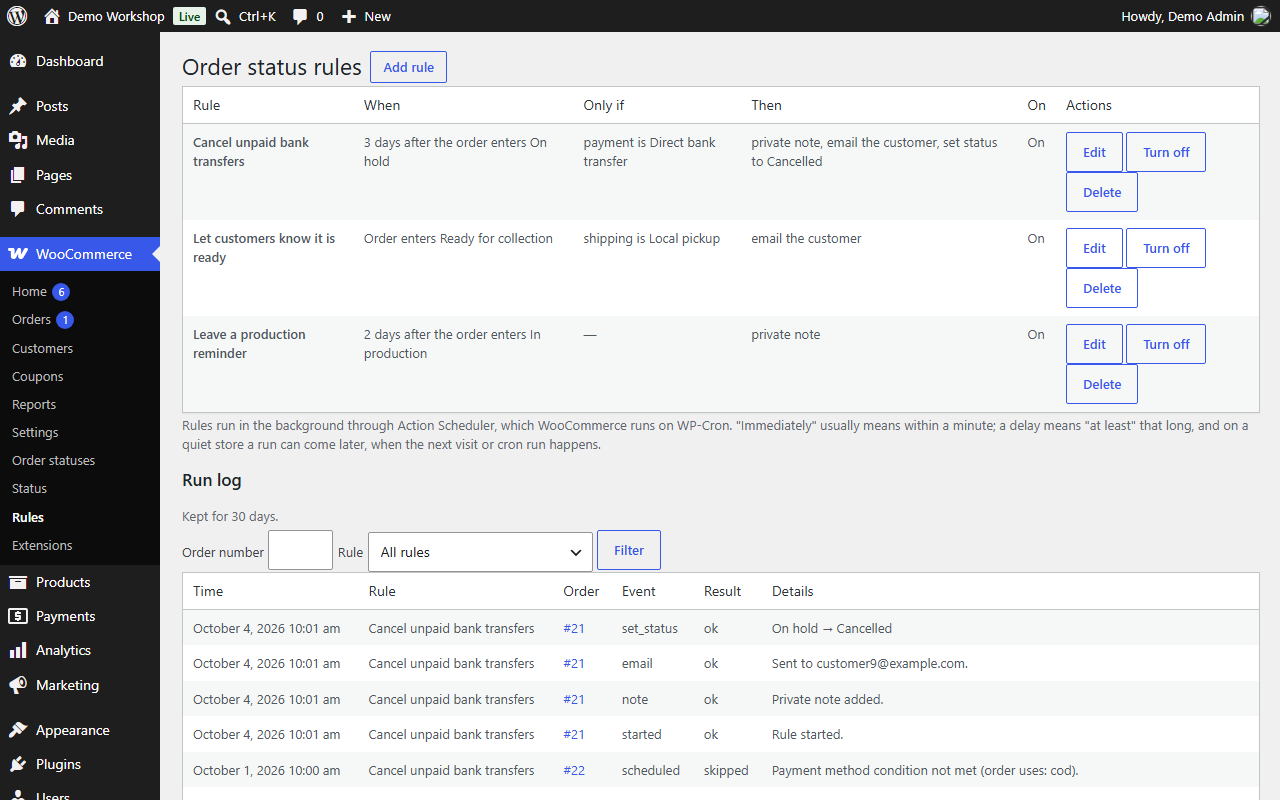
Order status rules listing three example rules
Three example rules in OrderHue Pro. Scroll horizontally on a narrow screen.

Starts when the status changes.

Pick any status, including your own custom ones, and the rule starts when an order enters it. It acts straight away or a set number of hours or days later. Rules run in the background, so a delay means “at least” that long.

One rule, several follow-ups.

Change the status, send an email with your own subject and text, and leave a private or customer-facing order note, all from one rule. Limit a rule to certain payment or shipping methods.

A log that explains itself.

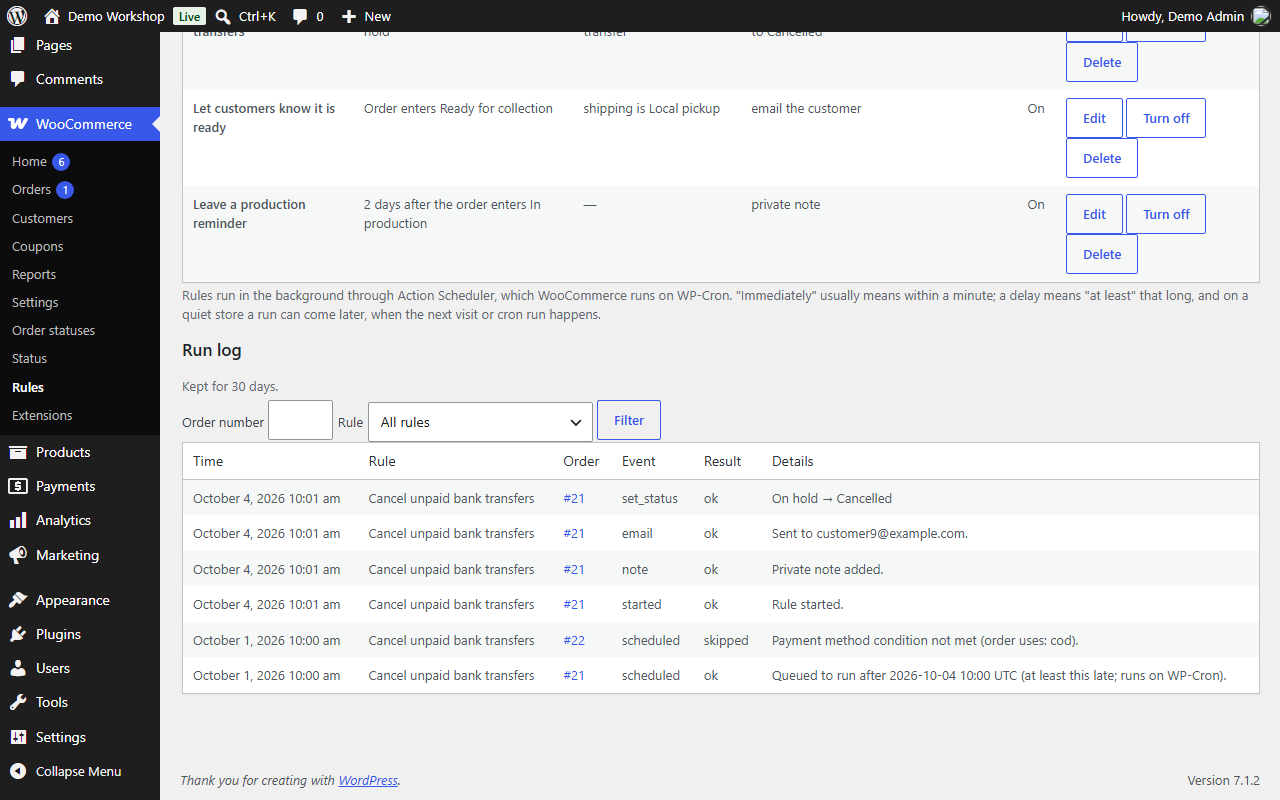
WooCommerce → Rules lists every run, action and skip, by order or by rule, with the reason a rule did nothing (for example, “Payment method condition not met”). Entries are kept for 30 days, and each action also leaves a note on the order.

What a rule does

When:
an order enters a status, or a set number of hours or days after it entered one.
Only if:
choose a payment-method condition, a shipping-method condition, or both. Each can require a match or exclude selected methods. When both are set, both must match.
Then:
change the status, send an email, and/or add an order note.

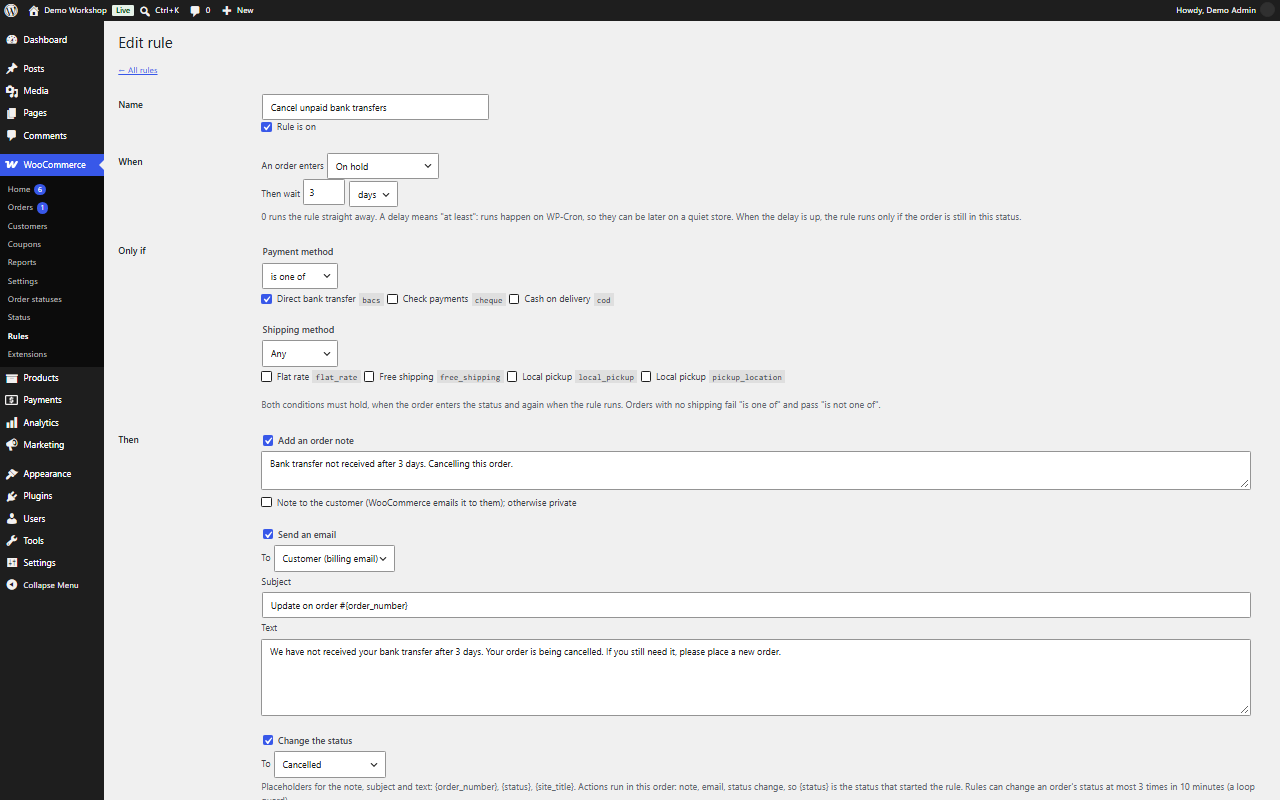
Example: “When an order has been On hold for 3 days and was paid by bank transfer, change it to Cancelled and email the customer.”

Every rule run is recorded in a run log for 30 days, so you can see what happened to each order and why.

Delays mean “at least”: they run on WordPress cron, so on a quiet site a rule can fire a little later than set.

Rule editor showing payment and shipping conditions and follow-up actions
Choose conditions and the actions a rule takes. Scroll horizontally on a narrow screen.
Run log showing actions, a skipped run and its payment-method reason
The run log records actions and explains skips. Scroll horizontally on a narrow screen.

Already using a free rules plugin?

Good free plugins can already move orders between statuses on a schedule, and some offer more conditions than OrderHue Pro does. Pro is for stores that manage their statuses in OrderHue and want those statuses to trigger the follow-up: an email or an order note as well as a status change. Everything is set up in the same place as your statuses, with a log that explains each decision. If all you need is “move orders from one status to another after a few days”, a free plugin may be enough. If you want the follow-ups too, Pro costs $39 a year for one site and comes with a 14-day money-back guarantee.

How does Pro compare? See custom order status plugins compared.

Pricing

Prices are in US dollars and exclude VAT. Pro is sold by our reseller and merchant of record, Freemius, Inc., which adds any VAT due for your country and shows the full total before you pay. Each plan renews yearly at the price you first paid, and you can cancel at any time. 14-day money-back guarantee, including after a renewal: see refunds. OrderHue is made by Choodle Ltd, 71-75 Shelton Street, Covent Garden, London WC2H 9JQ, United Kingdom.

Install Pro

  1. Buy a plan. Your receipt email contains your licence key and a download link for orderhue-pro.zip.
  2. Keep the free OrderHue plugin installed and active; Pro builds on it.
  3. Go to Plugins → Add New Plugin → Upload Plugin and upload orderhue-pro.zip. Then activate it.
  4. Enter your licence key when asked.

Pro checks your licence with Freemius, our merchant of record and licensing processor. When you activate a licence, Pro sends Freemius the email address, first name and last name of the WordPress administrator activating it, your site’s address and your licence key, only to issue, validate and support the licence. When you activate it, and from time to time afterwards to check for updates, it also sends the Pro and Freemius SDK version numbers and whether Pro is active. The activation screen also offers Diagnostic info (your WordPress and PHP versions and your site’s title and language) and Plugins & themes list. Both are off unless you switch them on. It doesn’t track how you use Pro, and it sends nothing about your orders or your customers. See the privacy policy.